The EBCDIC extract of your migration, read with its copybook.
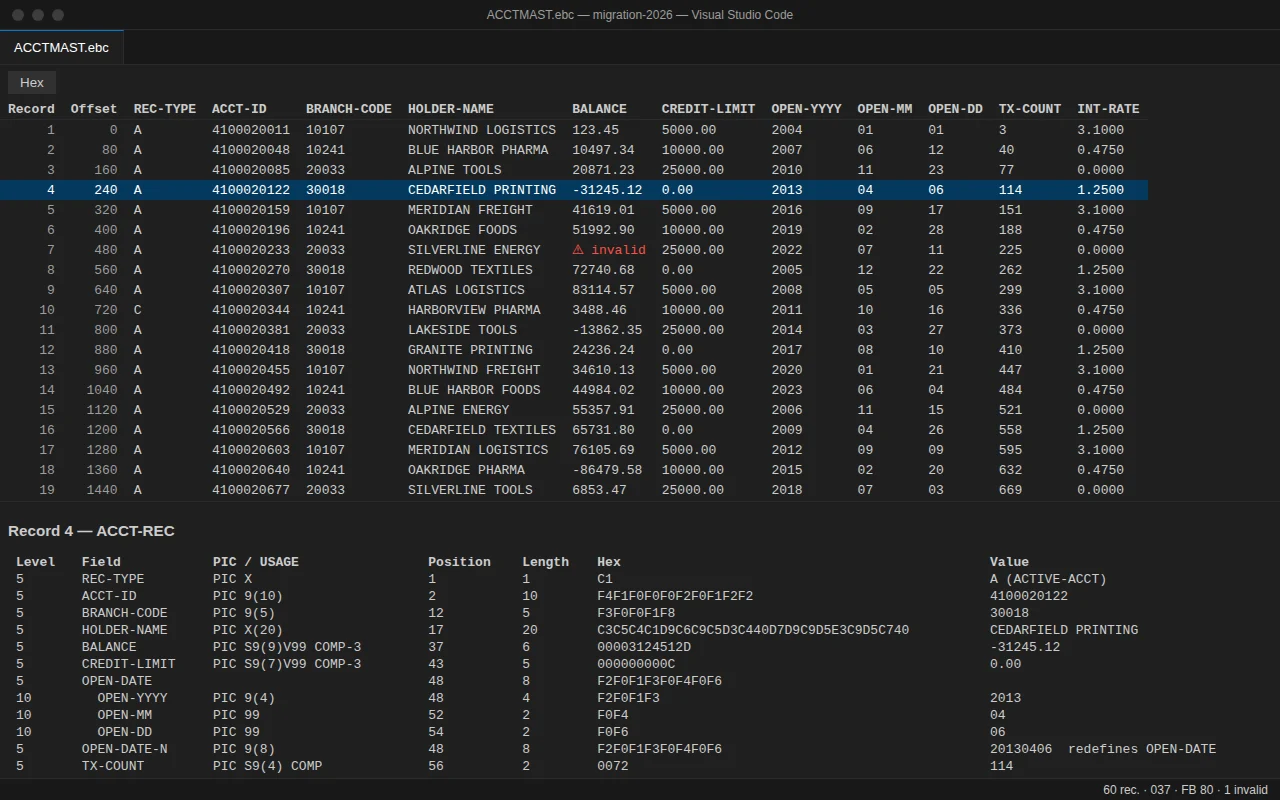
No mainframe connection, no Java to install, no upload. Open the binary file in VS Code, pick its copybook, and read every record field by field: packed decimals (COMP-3), signed zoned numbers, binary, REDEFINES, OCCURS. Every value sits next to its bytes in hex, so you can check what was decoded.
- Nothing uploaded
- No mainframe connection
- Read-only, hex next to every value
How it works
Three steps, no account, no file leaves your machine.
- Open the fileFiles ending in .ebc or .ebcdic open in the viewer. For any other file (.dat, .seq, an unload): right-click, Open With…, Mainframe File Viewer.
- Check how it is readThe first screen proposes the copybooks found next to the file, the code page and the record format it detected (FB with its length, VB with RDW or BDW), with a preview of the first records.
- Read, find, compareOne row per record, one column per field, the selected record detailed with PIC, position, length, hex and value. F8 goes to the next invalid value; another file can be compared with this one.
What the extension does
A reader for binary extracts, not an editor and not a mainframe client: it never changes your files and never connects to z/OS. It saves you the hex calculator and the round trip to whoever still has mainframe access.
COMP-3 next to its hex
COMP-3, zoned, binary (COMP, COMP-4, big-endian COMP-5), COMP-1, COMP-2, NATIONAL and text decoded; leading zeros of codes and dates kept. Reference: IBM Enterprise COBOL for z/OS.
Copybooks as they are written
REDEFINES with every view decoded on the same bytes, OCCURS with a fixed count, level-88 names, nested COPY, copybook offsets and lengths. Fixed (columns 7 to 72) or free format.
Fixed and variable records
F and FB: every field decoded. V, VB, RDW and BDW: each record listed with its length, text and hex. A warning when a file was transferred in text mode instead of binary.
Find the record that breaks the load
Invalid values counted and found one by one (F8), text and hex search, go to a record. Large files are read in pages, never loaded whole.
15 EBCDIC code pages
037, 1047, 273, 297, 500 and 1140 to 1149, plus ISO-8859-1 and Windows-1252. The code page can be changed at any time from the status bar.
Compare source and target
Two files compared by position (EBCDIC, ASCII or CSV): records compared, identical and different, differences per field. Pro adds each difference with its record number, both values and their hex, matched by a key of 1 to 3 fields.
Several record types (Pro)
Header, detail and trailer in one file: each record read with the layout chosen by a field value such as REC-TYPE. Free: one layout for the whole file, and the count of records of each type.
Export to CSV and JSON (Pro)
The whole file, the filtered records or a selection, with decimals and leading zeros kept. The CSV delimiter and decimal separator follow the language of VS Code.
100% local
Your files and copybooks never leave this machine: the only network call is the licence check. Activation needs one connection to api.gumroad.com (through your VS Code proxy settings); after that, Pro works offline.
Free, and Pro when you need it
The free version reads a fixed-length file with its copybook, completely, with no time limit. Pro is for the migration acceptance: files with several record types, VB and OCCURS DEPENDING ON cut into fields, the comparison difference by difference, the export. Paid once.
Free
No time limit, no account.
- EBCDIC files read with their copybook, hex next to every value
- COMP-3, zoned, binary, COMP-1, COMP-2, NATIONAL
- Fixed-length records (F, FB): every field decoded
- Variable records (V, VB) listed with length, text and hex
- REDEFINES, OCCURS, level 88, nested COPY
- 15 EBCDIC code pages
- Invalid values found one by one; text and hex search
- Two files compared: counts per field
- VB and OCCURS DEPENDING ON cut into fields
- Several layouts in one file
- Export to CSV and JSON
Pro
One key for one person, on up to 5 machines. One-time purchase.
- Everything in the free version
- Several record layouts in one file: each record read with the layout chosen by a field value (for example REC-TYPE)
- Variable records (VB) and OCCURS DEPENDING ON cut into fields
- Comparison details: each difference with its record number, both values and their hex, records matched by a key of 1 to 3 fields (repeated keys matched in file order), numeric tolerance, ignored fields, the differences exported to CSV
- Export to CSV and JSON (whole file, filtered records or selection), decimals and leading zeros kept
- Filter: the grid shows only the matching records, ready to export
- Works offline once activated
Refund within 14 days. Payment, invoice and VAT handled by Gumroad, merchant of record.
Frequently asked questions
Is my file sent anywhere?
Your files and copybooks never leave this machine: the only network call is the licence check. Activation needs one connection to api.gumroad.com (through your VS Code proxy settings); after that, Pro works offline. The licence check carries the key and the product identifier, never a file, a copybook or their content. No telemetry.
Do I need a mainframe connection, Zowe or Java?
No. The extension reads a file on a disk of this computer, with its copybook, inside VS Code. Nothing to install besides the extension, no connection to z/OS.
Which files and copybooks are read?
Reference: IBM Enterprise COBOL for z/OS. Every decoded value is shown with its bytes in hex, so you can check it. Records F, FB, V, VB, RDW and BDW; COMP-3, zoned, binary, COMP-1, COMP-2, NATIONAL; REDEFINES, OCCURS, OCCURS DEPENDING ON (Pro beyond the table), level 88, nested COPY; 15 EBCDIC code pages.
What is not covered?
Not covered in this version: raw VSAM clusters (flat unloads, such as a REPRO to a sequential file, are read); Micro Focus and GnuCOBOL file headers, little-endian COMP-5 and COMP-X; RECFM U; DBCS (PIC G); PL/I and assembler (DSECT) layouts; files on remote or virtual file systems (copy them to a folder on this computer); repairing a file transferred in text mode (it is detected, not repaired); editing files; connecting to the mainframe. SYNCHRONIZED alignment is not applied: a warning says that the following fields may be shifted, and the hex lets you check. Level 66 RENAMES is ignored, with a warning. A layout of more than 20 000 fields once its OCCURS are expanded, a record of more than 16 MiB, or a PICTURE of more than 100 000 characters is refused with a message (never shortened); COPY statements nested more than 10 levels deep are not included, with a message. In a comparison, a CSV row longer than 1 MiB stops the comparison with its row number and byte. On screen, the grid cuts a value after 256 characters (“…”; fewer for a layout of more than 2 048 columns), the detail does so once 524 288 characters of values of a record are shown and lists at most the first 2 000 fields of a record (fewer when their values are long, with a note), and the text and hex dump of a record stop after 64 KiB; “Copy record (tab-separated)” copies whole values.
What is the difference between free and Pro?
Free reads fixed-length files with their copybook, lists variable records, finds invalid values and counts the differences between two files. Pro reads files with several record types, cuts VB records and OCCURS DEPENDING ON into fields, details each difference of a comparison (matched by key, with tolerance and ignored fields), filters the grid and exports to CSV and JSON.
On how many machines can I use my key?
One key for one person, on up to 5 machines. A machine is counted the first time the key is activated in a VS Code installation: a new computer, VS Code reinstalled with its data erased, or a non-persistent virtual desktop whose identifier changes. Entering the key again, trying again after a network error, removing and re-entering it on the same installation, or updating the extension uses nothing. New computer or VS Code reinstalled? Write to support@novair.app with your purchase e-mail and we reset the count.
Can I get an invoice, with or without VAT?
The price is EUR 74.17 + VAT where applicable; Gumroad, merchant of record, shows the exact amount for your country at checkout. Need an invoice? Use the “Generate” link at the bottom of your Gumroad receipt: enter your name and business address, add what your accounts need under “Additional notes”, and download the PDF. An EU business that paid VAT can enter its VAT number there: Gumroad refunds the VAT and the invoice shows no VAT. Gumroad cannot change an invoice afterwards.
What about updates?
Updates come through your extension store (VS Code Marketplace or Open VSX); a later version never takes away what your key unlocks.
My company network blocks Gumroad. What happens?
Activation needs one connection to api.gumroad.com, through your VS Code proxy settings. If it cannot get through, the free version keeps working, and you can ask for a refund within 14 days at support@novair.app.