Free online tool, read in your browser
EBCDIC file viewer and converter, in your browser
Drop an EBCDIC file from a mainframe (a dataset unload, a binary FTP transfer, a card-image file): each record is shown with its hex on the left and the decoded text on the right, in code page 037, 500, 1047, 1140 or eleven other EBCDIC code pages, split by the record length you enter. Copy the decoded text in one click. The file is read 100% in your browser: nothing is uploaded.
- Nothing uploaded: the page cannot send your file
- 15 EBCDIC code pages, hex next to the text
- Free, no sign-up
Drop an EBCDIC file here
or choose a file, up to 1 MB. It is read on this page, nothing is uploaded.
No file at hand? Try a sample (fictional data):
Free online: the first 200 records of a file up to 1 MB. Bytes that are not text (packed decimal, binary) are shown as · next to their hex; the online viewer does not read copybooks.
An in-house format, or a rule of your own? We build the converter or the checker for your files at a fixed price: EUR 490 + VAT where applicable, per work package, delivered in 5 working days, refunded if it does not do what was agreed in writing. See the work packages
An EBCDIC to ASCII converter that shows its work
Each record is shown twice: the bytes in hexadecimal on the left, the characters they stand for on the right. C1 is A, F1 is 1 and 40 is a space in every EBCDIC code page; 4A, 5A, 5F, BA and BB change from one code page to the next. Copy the decoded text, one record per line: it is plain Unicode text that any editor saves as ASCII or UTF-8.
Split by record length
Mainframe datasets have no line breaks: a RECFM FB file with LRECL 80 is 80-byte records end to end. Enter the record length from the JCL (DCB=(RECFM=FB,LRECL=80)) or from the dataset attributes, and the viewer cuts the file into records. Without one, it tries common lengths (80, 133, 132, 100 and others) that divide the file exactly, and says it guessed.
What a code page cannot convert
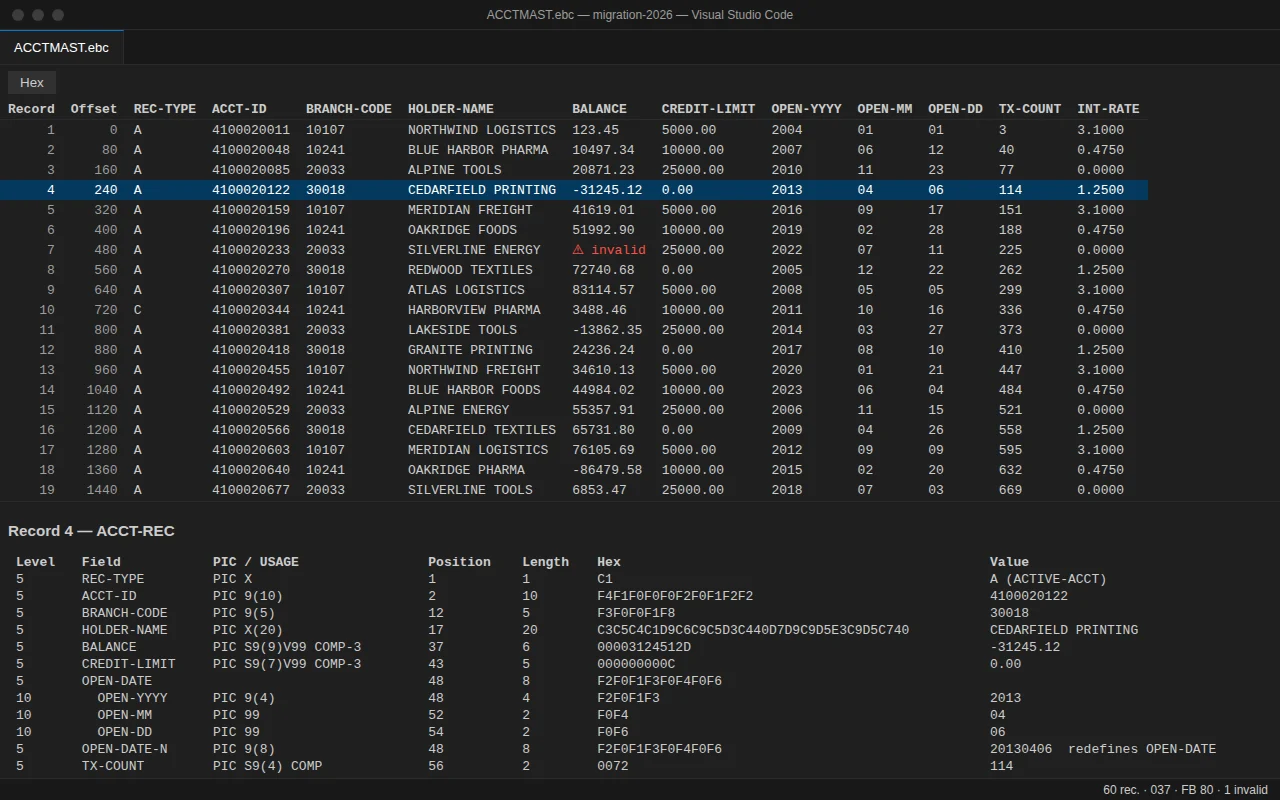
Packed decimal (COMP-3), binary (COMP, COMP-4, COMP-5) and floating-point (COMP-1, COMP-2) fields are numbers, not characters: no code page turns them into text. The viewer shows their bytes as ·, finds the zones that look like packed decimal (digit nibbles closed by a C, D or F sign) and decodes them as a guess in the record detail. To read every field by name, with its decimals, Mainframe File Viewer for VS Code uses your COBOL copybook.
Samples you can load
Two fictional files: a customer master unloaded as RECFM FB, LRECL 80, with a PIC S9(9)V99 COMP-3 balance at offset 58, and a 14-card JCL job in code page 037 with [ ], ¬ and ^ in it. Switch the code page to 1047 or 500 and watch those characters change.
Questions
How do I convert an EBCDIC file to ASCII online?
Drop the file on this page or choose it (up to 1 MB), pick its code page (037 if you do not know: US and Canada mainframes) and enter its record length. The Text column is the converted text, and Copy the decoded text puts it on your clipboard, one record per line, as Unicode text that any editor saves as ASCII or UTF-8. Text fields convert byte for byte; packed and binary fields do not (see below). The file must have come from the mainframe in binary mode: a text-mode FTP transfer has already converted it, and broken its packed fields on the way.
Which EBCDIC code page is my file: 037, 500, 1047 or 1140?
Letters, digits and the space are the same in all of them (C1 = A, F0 = 0, 40 = space), so look at the punctuation. In 037 the square brackets [ ] are BA and BB, ¬ is 5F and ^ is B0. In 1047 the brackets are AD and BD, and ¬ and ^ swap places: ^ is 5F, ¬ is B0. In 500 the brackets are 4A and 5A, the bytes that read ¢ and ! in 037. 1140 is 037 with the euro sign € at 9F, where 037 has ¤. The pound sign £ is B1 in all four, but 5B in 1146 (United Kingdom). Find a byte you know, a bracket in a JCL card or a £ in an address, and switch the code page until it reads right.
Why do I see garbage after the conversion?
Because some fields are not text. A PIC S9(7)V99 COMP-3 amount of -31245.12 is stored as the five bytes 00 31 24 51 2D: through code page 037 that is four control characters and an é. A binary PIC S9(4) COMP of 1 is 00 01. A converter that maps every byte through a code page destroys those fields. They can only be read with the record layout, the COBOL copybook, which says where each field starts, its type and its decimals. This viewer shows those bytes as · and decodes the zones that look like COMP-3 as a guess; Mainframe File Viewer for VS Code reads them with your copybook.
Is my file uploaded?
No. The page reads the file with your browser's own JavaScript, in a Web Worker, and its security policy (connect-src 'none') forbids any network connection once the page has loaded. Open your browser's developer tools on the Network tab, then drop a file: no request appears. Nothing is stored either: closing the tab forgets the file.
What is the record length (LRECL)?
The size of each record, in bytes. Mainframe datasets carry no line breaks: RECFM FB (fixed blocked) with LRECL 80 means 80-byte records one after the other, the classic card image. You find it in the JCL that created the file (DCB=(RECFM=FB,LRECL=80,BLKSIZE=27920)), in the dataset attributes (ISPF option 3.4, or LISTCAT), or in the copybook: the length of its 01 level. A wrong length shows as text that drifts a few columns on each row. Variable records (RECFM VB) start with a 4-byte length (the RDW): open those in the extension.